
Demos
See Konciv in action
Try the resource planner and equipment scanning yourself, and watch short tours of key areas of the Konciv platform.
Try the resource planner
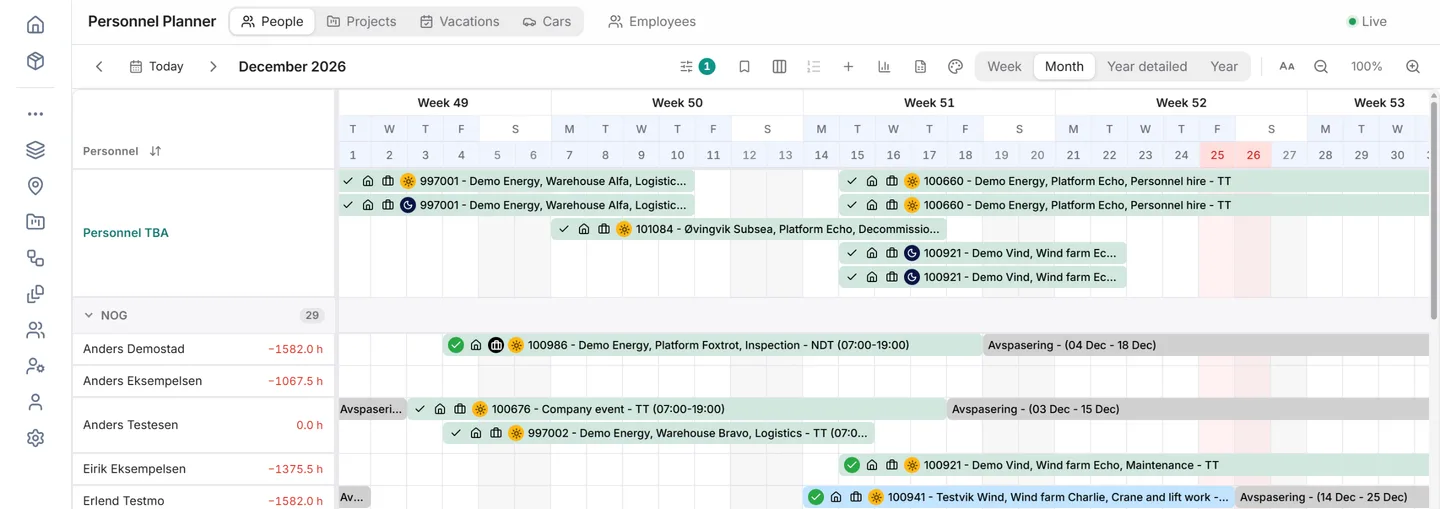
Switch between people, projects, vacations and equipment, step through the weeks, open any bar for details, and fill the open welder position from the matching candidates. All names and data are made up.
Made-up crew across four weeks with offshore rotations, travel days, a course and vacations, an open welder position with three matching candidates, and a warning that a certificate expires in 12 days. The Equipment tab shows tools and units assigned to the same projects, and one item in maintenance.
Matching candidates: Welder, Rig North
- Jonas Berg Qualified welder, free for the whole rotation
- Maria Lunde Welder and rigger, free from 16 November
- Erik Dahl Qualified welder, safety course expires in December
The same planner in the real app
This is Konciv’s Resource Planner in a demo company. The names and projects are made up.
Try scanning equipment onto an order
Press Scan on a label, or type a serial number and press Enter, the way a handheld scanner does. Tick what goes out, set the rental dates and commit it to the order, then scan it back in under Receive back. All equipment and orders are made up.
Six made-up items with barcode labels, and rental order RO-1042 for Rig North. In Send out, scan a label or type a serial number and press Enter to tick the item, then review the dates and commit it to the order. In Receive back, scan it again to tick its line, choose a process step and receive it. One item is already out on another order.
Equipment with labels
- 88231 TW-2281 Torque wrench 1/2", 60–340 Nm Shelf A-12
- 40917 PT-3140 Pressure test pump, 1500 bar Shelf A-14
- 11520 GD-3305 Gas detector, 4-gas Shelf B-03
- 70344 HJ-4417 Hydraulic jack, 50 t Out on RO-1038
- 23006 HK-5120 Hose kit 3/8", 10 m Shelf B-11
- 51879 LS-6031 Lifting sling 2 t, 3 m Shelf C-02
Add Rental Line
Scan labels or search for items to add.
- Available
- Available
- Available
- Has active rental line (RO-1038)
- Available
- Available
Every line needs a From date and a To date.
Receive Lines
Scan returned equipment to tick its line.
- RO-1038
No lines to receive. Send something out first.
Deep dive into the Konciv platform
Get inspired by some of the key solution areas in Konciv, presented in short videos.
-
Personnel -
Rental and sales -
Maintenance -
Procurement -
Terminal operations
In our customers’ words
Read customer stories-
“Now, shift updates are fast and simple. I have more time for other tasks, and Konciv’s platform is both smart and easy to use.”
Frida Elise Andersen Personnel Coordinator, Norse Cutting -
“Konciv is simplicity at its finest. No unnecessary bells and whistles—just the functionality we need.”
Terje Berg Commercial Lead, Føn Energy Services -
“The system finds the most suitable personnel and suggests a shift arrangement, which a coordinator then decides on – and suddenly there are people at work.”
IKM Elektro On LinkedIn
See it with your own processes
Book a demo and we will walk you through Konciv using examples from your own industry. No preparation needed.